DuoCardsD
DuoCards
Apr 1

Being able to choose which side of card (native/target) to show as first / Choose Learning Direction

I get the best results from recall type of cards, and not recognition type of cards. Specifically, I would like to skip all the TargetWord -> Meaning in English cards, and just work with Sentence in English -> Sentence in target language cards. Being able to choose card types seems like a reasonable way to enable this.
PendingPending

merged·6 days ago
merged·Jun 25, 2026
Jun 21, 2026

Yeah this feature is crucial especially for languages like german in which you also need to memorize the “artikel” aswell. So when i see the native at first, i can recall the word with it’s artikel.

Jun 21, 2026

Yes absolutely 👍🏻 that would be great

merged·Jun 9, 2026
merged·Jun 8, 2026
merged·Apr 16, 2026
Apr 16, 2026
from

Hello, cards will switch to the native language side over time as part of the learning process. It is intentionally designed this way to prioritize initial exposure to the target language for easier recognition. Hope that makes sense.

Apr 17, 2026

Thanks for the explanation, but honestly this doesn't make sense — at least not for complex languages like Japanese. For Spanish, French, or Italian, sure. But for Japanese, forcing bidirectional learning from the start is overwhelming for beginners. Research on language acquisition consistently shows that prioritizing comprehension first — target to native — and introducing production much later leads to far better results. Ideally users should be able to choose per word or per deck whether to learn in both directions or target to native only. This would make the app significantly more effective for learners tackling complex languages.

Apr 23, 2026

Thank you for the detailed explanation and valuable feedback. I’ll pass your suggestion on to the team for consideration, especially regarding more flexibility in learning directions for complex languages like Japanese.

Mar 21, 2026
from

@jana8977 hello Jana, I know you guys are very busy but I really hope you can make this feature happen fast, I hope it's not too assuming to think that this is quite a simple feature: show the example side of the flashcard first ☺️. If you can, can you pls give me a period of time so I can know how long I'll have to wait?

Mar 17, 2026
from

so actually a hint for the word before revealing it?

Mar 18, 2026
from

I'm not sure what you mean by "a hint". But i wanna see the full example sentences/phrases of the new word–aka the context of using that word with its colloquial. If you put it this way—using context to evoke one's memory, yes, a hint, a big hint, please.

Mar 16, 2026
from

@jana8977 Hello Jana, i hope you can see this post, thank you!! 😊

Mar 17, 2026
from

Hi, you mean that you want to see first the example sentence or the word in the target language (that one you are trying to learn)?

Mar 18, 2026
from

Hi, i want to see the example sentences (the context) first!

Mar 30, 2026
from

Thank you for the clarification. We will consider this feature based on other plans and also on users´ voting here.

merged·Mar 3, 2026
merged·Mar 3, 2026
merged·Mar 3, 2026
Mar 2, 2026

I strongly agree that this is a crucial feature. Ideally, users should be able to decide the learning direction when a new word is introduced. For example, very common or essential words could be practiced in both directions, while less critical vocabulary could be learned only from target language to native language (e.g. Japanese → English). This would make learning far more efficient, especially for difficult languages, by allowing learners to focus first on comprehension and only later on production where it truly matters.

merged·Feb 20, 2026
merged·Feb 20, 2026
Feb 1, 2026

Still really need this

Sep 29, 2025

Just realised there was this post after posting my one. I think it is crucial to be able to choose which cards are shown first (native or target language), and then to be able to put a side on learn while the other keeps being shown. For example, I might recognise a word in the target language and know what it means (so it should go in the learned), but if you show me first my native word, I might struggle to remember the target language translation (so it should be kept in the learning)

Aug 16, 2025

Hi Meka! 🙂 This idea already exists in Canny and has a solid base of upvotes, so I’ll merge yours into it to consolidate the votes and keep everything organized. ✌️ You can find it under the name: Being able to choose card types or which side of a card to show. Michaela

Jul 25, 2025

I agree with the idea that the user should be able to choose the 'study mode' or type for a given card. Maybe when I begin to study a language I prefer typical flashcards with the target word on one side and the translation on the other, but later on I might feel more confident and I would rather study only from examples in the target language, with no need for translating to my native language.

Jul 7, 2025

Hi Mark, thank you for your post. I am merging your idea into an existing one related to this topic "Being able to choose card types and which type of card to show" to consolidate votes and keep things organized.✌️Michaela from DuoCards

Jul 7, 2025

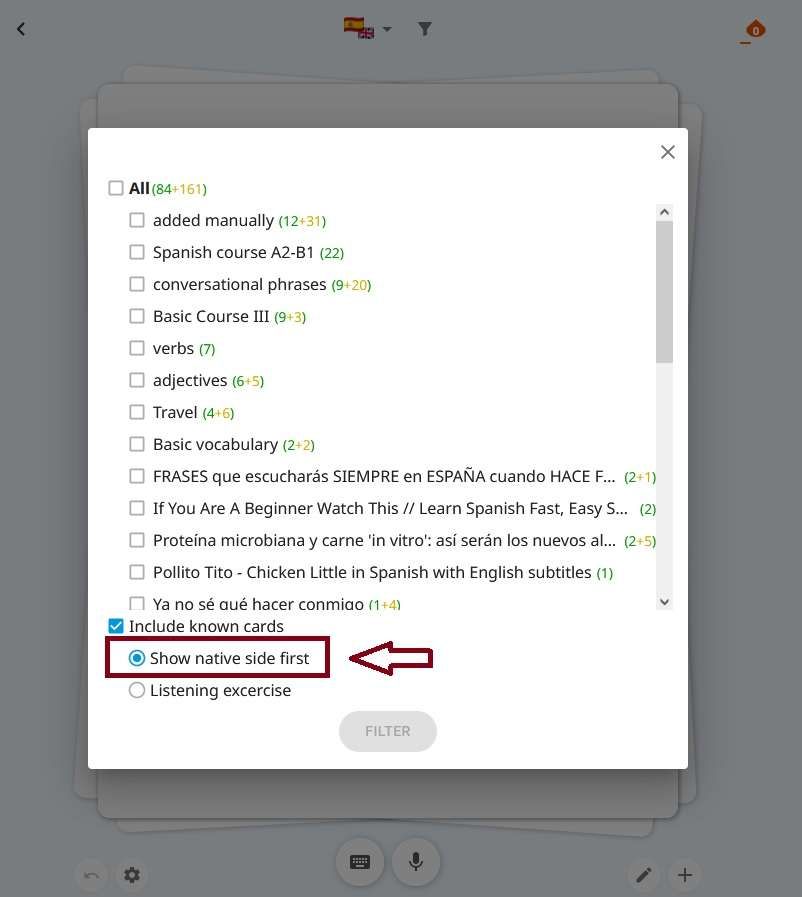
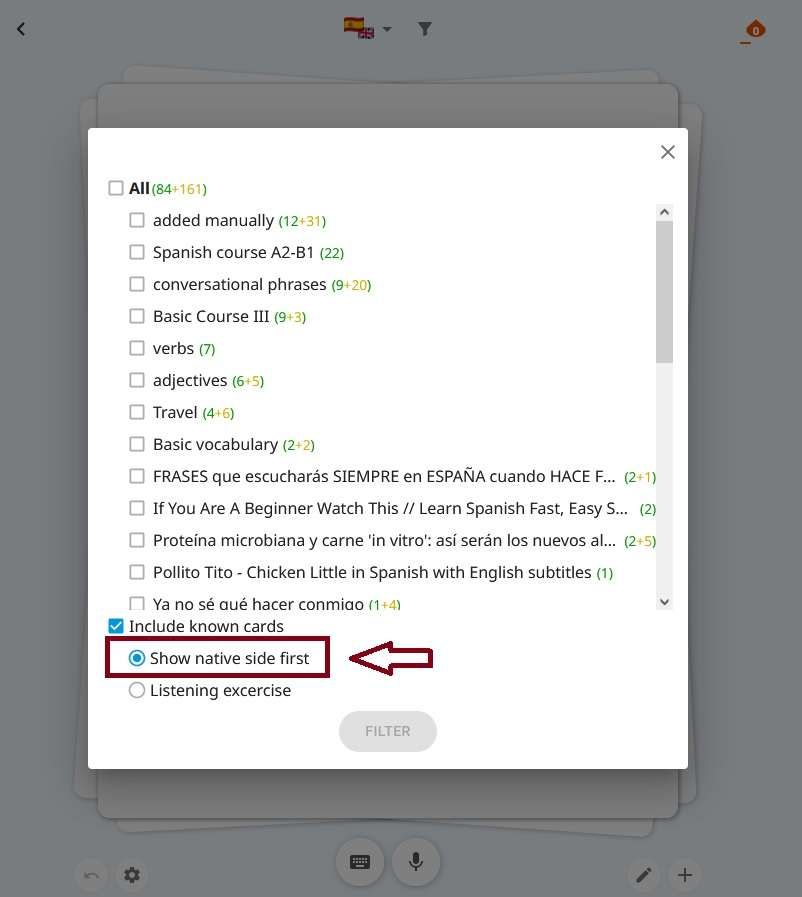
Hello Marcos, cards will switch to the native language side over time as part of the learning process. It is intentionally designed this way to prioritize initial exposure to the target language for easier recognition. However, in the premium version you can choose to see the native side first using the filter feature. Hope that helps! ✌️ Michaela from DuoCards

Sep 29, 2025

Michael I've tried this and I'm still getting the cards with my language first, instead of the target language...

Jul 4, 2025

Hi Andrea, thanks for your post! Your idea is already on Canny, so I'm merging it into the existing post "Being able to choose card types or which side of cards to show" to consolidate votes and keep everything organized. ✌️ Michaela from DuoCards

May 7, 2025

Hi Jacob, thank you for your post. I am merging your idea into an existing one related to this topic "Being able to choose card types or which side of cards to show" to consolidate votes and keep things organized.✌️Michaela from DuoCards

May 4, 2025

Hi Michael, thank you for your post. I am merging your idea into an existing one related to this topic "Being able to choose card types or which side of cards to show" to consolidate votes and keep things organized.✌️Michaela from DuoCards

Apr 21, 2025

Hi Raimundo, just to make sure I understand you correctly: Are you saying that when you translate words from your native language into the one you're learning, it's fine — but when you see the words in the target language, you can't translate them back into your language? Michaela from DuoCards

Apr 21, 2025

Michaela the app has two learning modes:** 1. It shows you the card in the target language, and when you click, it reveals the translation in your native language. 2. It first shows you the card in your native language, and when you click, it shows the word in the target language. I’ve noticed that when you add a new word, the first time it appears is usually in the target language. At that moment, it’s easier to remember because the word is still fresh and the response time is very short. After that, the app mostly shows the word in your native language so you can try to recall it in the target language. Most of the repetitions follow this second format. When the app tells me that a word is already learned, I realize that it’s much easier for me to recall the translation into the target language when I see the word in my native language outside the app. However, when I come across the word in the target language outside the app, I often don’t remember what it means in my native language.

May 19, 2025

Raimundo: Hi Raimundo, thank you again for your post. I am merging your idea into an existing one related to this topic "Being able to choose card types or which side of cards to show" to consolidate votes and keep things organized.✌️Michaela

Apr 21, 2025

Hi Yazan, thanks for your post! I understand what you mean and your idea is already on Canny, so I'm merging it into the existing post "Being able to choose card types" to consolidate votes and keep everything organized. ✌️Michaela from DuoCards

Apr 18, 2025

Hi, just to be sure—by "front of the card," do you mean the side in your target language? It’s set up this way on purpose because learning words from both sides is more effective for language acquisition. It’s naturally easier to guess the meaning when starting from the target language, which is why you’ll see that side more often at the beginning and less as you progress. If you meant the side in your known language, you can choose to see that side first by using the filter feature. I’m sending you a screenshot to help. Michaela from DuoCards

Apr 19, 2025

Michaela Yes, I'm talking about the former. My issue is that it would hard to memorize the kanji, especially if there are many lookalikes of it. For example, 意思 and 意志.

May 4, 2025

暗い光: Ok, I understand :) I am merging your post into an existing one that we already have on this topic to consolidate votes.:) You can find it under the name "Being able to choose card types or which side of cards to show." Michaela

Jun 2, 2025

Michaela yes, would be nice to have this option to see the target language side first. Currently, the only option available is "show native language first", but the opposite is missing.

Feb 14, 2026

This would be great! I have the same request....is there already a solution to our problem?